
Adding a contact
- Open Namola and tap on Map
- Slide up contacts drawer and tap on Add Contact
- Select the contact from your address book and tap "Done".
- You're now sharing your location with that person!
You'll start receiving Smart Alerts for users who are sharing location back to you. Smart Alerts are like an automatic "text me when you're home". It notifies you whenever your loved one starts or ends a trip.
Give it a try — we think you'll like it. If you don't, just tap the "bell" next to the person's name in the contracts drawer to stop the Smart Alerts.
Deleting a contact
If you want to delete a contact to stop sharing location, simply swipe left on their name in the contacts drawer and select "Delete"
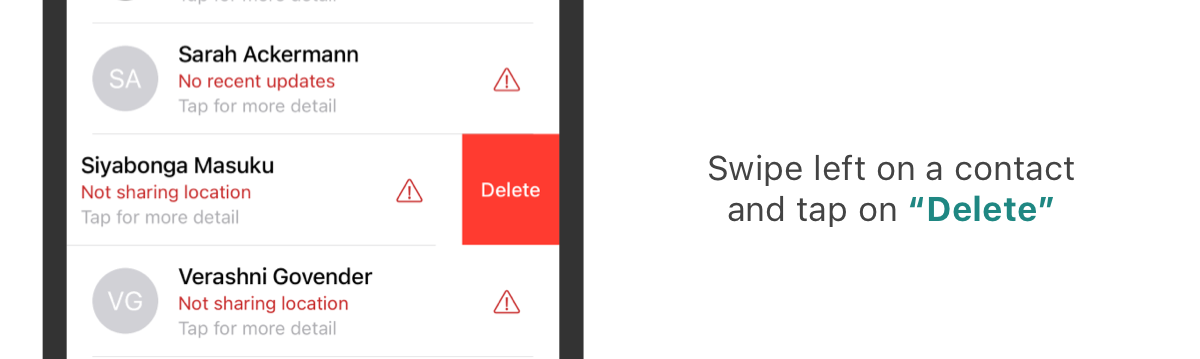
To do so, please follow the below steps:
- Open the Namola App.
- Slide up the contact drawer and find the relevant contact.
- Swipe the contact left and you will be presented with a "Delete" button.
- When you tap on the red "Delete" button a pop-up will appear in the middle of your screen giving you the option to delete or cancel the action
Reordering your Contacts
To reorder your contact list and have those nearest and dearest to you at the top of your contact list, see how simple this is.
- Open the Namola App.
- Slide up the contact drawer to view your contacts.
- Tap and hold the contact or associated device then move it up or down the list to be dropped where you prefer it to be located on your list.
Didn't find what you were looking for? Email our support desk.