
What is NamolaPlus?
We all know that you can access Armed Responders if you have it installed in your house, but what happens if something goes wrong and you need emergency assistance when you are out of your house? That's where NamolaPlus comes into play.
Namola Plus gives you access to private Armed Response and private Medical Response, anywhere you are.
How do I upgrade to Namola Plus?
Simply open Namola and tap on N+ to upgrade or find out more.
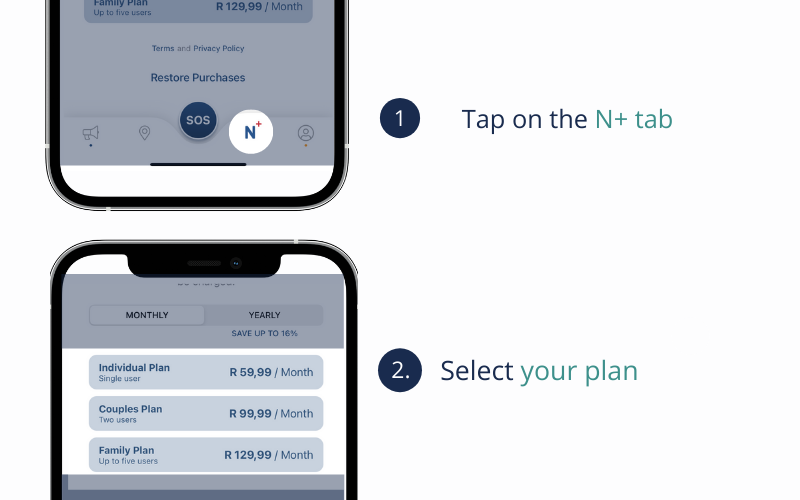
Existing NamolaPlus members can now see our coverage maps in the app by navigating to N+
How much does it cost to upgrade to Namola Plus:
| Name of plan | Number of members | Cost per month | Cost per annum |
| Individual | 1 | R 59 | R 649 |
| Couples | 2 | R 99 | R 999 |
| Family | Up to 5 members | R 129 | R 1299 |
Note: You can only buy one plan with in-app purchases, so the maximum amount of people that you will be able to buy for is 5
Benefits of Namola Plus
Whether you are dropping your kids at school, driving a long distance, popping to the shop or going on a night out, you can stay protected at the click of a button anytime, anywhere with NamolaPlus.
- Private response. Namola Plus gives you access to 2500+ private armed & private medical responders, resulting in faster response times from vetted response organisations.
- Faster dispatch and response. With smart technology, Namola Plus sends a direct notification of your GPS coordinates to the 24/7 Namola Response Center, expediting your call for help and substantially increasing response times.
- No need to answer your phone. Answering your phone in an emergency can be tricky, so if we can’t reach you we will send Armed Response to your GPS location.
- Response, even when you aren't at home. With Namola Plus you are not limited to getting help in your home. Namola Plus gets you help, anywhere, anytime.
-
Live location sharing, so your family always knows you're safe
-
With a Couples or Family plan, you can request help for loved ones, even when they can't call for themselves
How does Namola Plus work when I have an emergency?
After you have requested assistance with the SOS button, an alert is sent to our Namola Response Centre. A dedicated Response Centre operator will call you back, within seconds, to confirm your emergency.
They will send you the emergency assistance that you need, depending on the type of emergency that you have. Armed Responders are only told to stand down if it is confirmed that they are not needed for the emergency.
Namola Plus Coverage & Response Time:
Existing Namola Plus members can now see our coverage maps in the app by navigating to N+. Upgrade for your free month to see if there is coverage in your area
The response time may vary according to these factors:
- The location of the incident
- The time of day it is
- Categorisation of the incident
But be rest assured it is a FAST response!
We do not test response times as resources are reserved for real emergency situations.
Membership to Namola Plus is instant and there are no waiting periods for access to the services.
Private Medical Assistance
Users are not required to have medical aid in order to get a Private Ambulance if they are a NamolaPlus user and you will not be billed for the callout unless you refuse treatment by the paramedics. The cost of the Private Medical Response is included in your monthly subscription
Home Security and Namola Plus
Namola Plus is a personal safety tool. It aims to protect you anywhere, anytime. When Armed Responders are despatched from your request for assistance, they go to the GPS coordinates of where the alert came from (i.e. the GPS coordinates of your phone or your Namola Panic Tracker).
They will not be able to go to your house if you are not there. If you, therefore, need something to look over your possessions whilst you are not at home, we suggest that you get both NamolaPlus, and an alarm system linked to Armed Response in your home.
Didn't find what you were looking for? Email our support desk