---
title: "Introducing Smart Safety Alerts: know when it matters, without the noise."
description: "Introducing Smart Safety Alerts: know when it matters, without the noise\nChecking in on the people you love shouldn't feel like a full-time job. Smart Safety Alerts is here to change that."
---
[Skip to content](https://support.namola.com/introducing-smart-safety-alerts-know-when-it-matters-without-the-noise#main-content)
English
Show submenu for translations
[Still need help?](https://support.namola.com/kb-tickets/new?hsLang=en) [Customer portal](https://support.namola.com/customer-portal?hsLang=en)

- [Default HubSpot Blog](https://namola.hubspotpagebuilder.com/blog)
Open main navigation
Close main navigation
- [Default HubSpot Blog](https://namola.hubspotpagebuilder.com/blog)
- English
Show submenu for translations
- [Still need help?](https://support.namola.com/kb-tickets/new)
- [Customer portal](https://support.namola.com/customer-portal)
- Back to Website
Back to Website
How can we help you?
- There are no suggestions because the search field is empty.
1. [Help Centre](https://support.namola.com/?hsLang=en)
2. [Namola App](https://support.namola.com/namola-app?hsLang=en)
3. [App Features](https://support.namola.com/namola-app?hsLang=en#app-features)
# Introducing Smart Safety Alerts: know when it matters, without the noise.
## Checking in on the people you love shouldn't feel like a full-time job. Smart Safety Alerts is here to change that.
Most people know the feeling: you send a message, you wait, you refresh. You call, just to hear a voice and know everyone's okay. It's exhausting, and it doesn't actually make anyone safer, it just fills the waiting with worry.
Smart Safety Alerts gives you a better way to look out for the people you care about. Choose who you want to keep an eye on, and Namola alerts you only when the safety context meaningfully changes, for example when a loved one moves into an area with a lower Safety Score, stays there, or moves away from a usual route
### **How it works**
Once you've chosen who to keep an eye on, you decide how sensitive the alerts should be, and how long someone needs to stay in one place before you're notified. That means you get the alerts that matter, not a running commentary on every stop along the way.
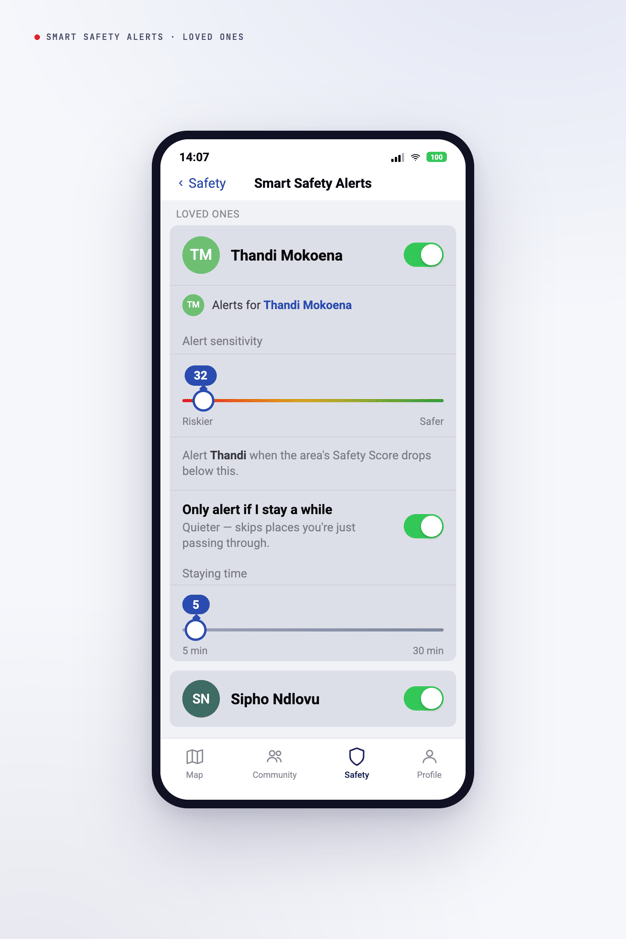
*Example: "Alert me if Amy moves into an area with a lower Safety Score."*
Behind the scenes, Smart Safety Alerts draws on Namola's Safety Score, which gives you a general view of relative risk in supported areas. It's a safety awareness tool, not a prediction or a guarantee, but it's enough to help you know when to check in and when to relax.
### **Why it matters**
Peace of mind shouldn't depend on constant check-ins. Smart Safety Alerts lets you stay connected to your family's safety in the background, so you can get on with your day and trust that you'll hear from Namola the moment it counts.
### **Get started**
Simply tap the Safety icon, select Smart Safety Alerts, and set them up according to your preferences.
- [Namola App](https://support.namola.com/namola-app?hsLang=en#main-content)
- [General](https://support.namola.com/namola-app?hsLang=en#general)
- [App Features](https://support.namola.com/namola-app?hsLang=en#app-features)
- [Getting started](https://support.namola.com/namola-app?hsLang=en#getting-started)
- [Settings](https://support.namola.com/namola-app?hsLang=en#settings)
- [Troubleshooting](https://support.namola.com/namola-app?hsLang=en#troubleshooting)
- [FAQ](https://support.namola.com/namola-app?hsLang=en#faq)
- [NamolaPlus](https://support.namola.com/namolaplus?hsLang=en#main-content)
- [General](https://support.namola.com/namolaplus?hsLang=en#general)
- [Namola Communities](https://support.namola.com/namola-communities?hsLang=en#main-content)
- [General](https://support.namola.com/namola-communities?hsLang=en#general)
- [Getting started](https://support.namola.com/namola-communities?hsLang=en#getting-started)
- [Everything members need to know about Namola Communities](https://support.namola.com/namola-communities?hsLang=en#everything-members-need-to-know-about-namola-communities)
- [Everything admins need to know about Namola Communities](https://support.namola.com/namola-communities?hsLang=en#everything-admins-need-to-know-about-namola-communities)
- [Troubleshooting Namola Communities](https://support.namola.com/namola-communities?hsLang=en#troubleshooting-namola-communities)
- [Namola Devices](https://support.namola.com/namola-devices?hsLang=en#main-content)
- [General](https://support.namola.com/namola-devices?hsLang=en#general)
- [Managing your device](https://support.namola.com/namola-devices?hsLang=en#managing-your-device)
- [Troubleshooting the Namola Panic Tracker](https://support.namola.com/namola-devices?hsLang=en#troubleshooting-the-namola-panic-tracker)
- [Panic Tracker FAQ's](https://support.namola.com/namola-devices?hsLang=en#panic-tracker-faqs)
- [Partnerships](https://support.namola.com/partnerships?hsLang=en#main-content)
- [PPS](https://support.namola.com/partnerships?hsLang=en#pps)
- [Namola General](https://support.namola.com/namola-general?hsLang=en#main-content)
- [Careers](https://support.namola.com/namola-general?hsLang=en#careers)
- [Legal](https://support.namola.com/legal?hsLang=en#main-content)
- [Namola - General](https://support.namola.com/legal?hsLang=en#namola-general)
- [Namola Plus](https://support.namola.com/legal?hsLang=en#namola-plus)
- [Accounts & Billing](https://support.namola.com/accounts-billing?hsLang=en#main-content)
- [Cancellations & Refunds](https://support.namola.com/accounts-billing?hsLang=en#cancellations-refunds)
- [FAQ](https://support.namola.com/accounts-billing?hsLang=en#faq)
- [Namola Watch](https://support.namola.com/namola-watch?hsLang=en)
- [Default HubSpot Blog](https://namola.hubspotpagebuilder.com/blog)
[](https://support.namola.com?hsLang=en)
Help Centre
Copyright © 2026, Namola EMS Group Pty Ltd